MrRobot Lab
CyberDefenders Endpoint Forensics Lab

Scenario
An employee reported that his machine started to act strangely after receiving a suspicious email for a security update. The incident response team captured a couple of memory dumps from the suspected machines for further inspection. Analyze the dumps and help the SOC analysts team figure out what happened!
Question 1
Machine:Target1 What email address tricked the front desk employee into installing a security update?
Answer 1
Despite the tools listed stating that you can use Volatility3, that doesn’t seem to be the case. I couldn’t find a good answer as to why, I think I need to make another profile in order to detect the kernel version. So I will be using Volatility2 for this lab.
First I need to run the imageinfo command to find out what profile I need to be using:
Using one of the suggested profiles, I then looked for any email clients that are running on the system.
I next dumps the files that are associated with OUTLOOK.exe.
There was one file that was pulled that caught my interest:
This gave me the email address of the person that received the malicious email, along with a file that might contain data pertaining to the sender. Sadly this didn’t work out, so next I tried using memdump to gather the process memory at time of capture. Then after which I used strings to grab any potential email address.
Strings:
Question 2
Machine:Target1 What is the filename that was delivered in the email?
Answer 2
Hedging a bet that the file is more than likely an .exe file, I used strings once again on the dmp file.
Finding the above in the first couple of lines. An .exe file.
Question 3
Machine:Target1 What is the name of the rat’s family used by the attacker?
Answer 3
Now knowing what the .exe file is called I need to dump the file and upload it to VirusTotal. First of all I need to find the memory address:
There are quite a few different options here. But the one in the downloads is truly what I am looking for, in other words the source file. There are however 3 of them, I just dumped each one to find a .dat file.
Both of the above addresses worked. Giving me the .dat file which contains the data of the malware, which I can then upload to VirusTotal.
A small note, sometimes the answers to the questions regarding malware families can be a little miss leading. Since there are a TON of different names that are listed in VirusTotal. For example, this malware goes by the names:
None of which are the answer, however knowing its a rat, xtrat and ratx are closest to what I need. In this case the answer is: XTREMERAT. Needless to say, I do not like these types of questions since the answer can be many different things depending on when you carry out the lab. For example, looking over 2 of the guides that are linked on the labs page have the answer given out by an anti virus vendor Webroot.


Question 4
Machine:Target1 The malware appears to be leveraging process injection. What is the PID of the process that is injected?
Answer 4
I needed a little nudge in the right direction for this one, plus I learnt a new malware technique in the process. Process hollowing. I had to get a new plugin for Volatility for this, which can be found here, I then tried to find any suspicious process hollowing attempts within the system.
There is one result in the list here that stands out from the rest. iexplore.exe, which is the Internet Explorer executable. The output notes: process base address and memory protection discrepancy, which after reading this article signaled to me I was on the right track.
Giving me the answer: PID 2996.
Question 5
Machine:Target1 What is the unique value the malware is using to maintain persistence after reboot?
Answer 5
When looking into malware maintaining persistence my first thought it looking into the registry keys. Going back to the VirusTotal results I can see that the malware sets the value MrRobot to be used on startup/reboot.

Question 6
Machine:Target1 Malware often uses a unique value or name to ensure that only one copy runs on the system. What is the unique name the malware is using?
Answer 6
Here I was looking for any type of mutated file name, one that would be different from the injected process from the previous question. There is a section on VirusTotal for this and it showed the following:

Instantly, fsociety0.dat stood out. There is another way of doing this, using Volatility. Using handles:
Question 7
Machine:Target1 It appears that a notorious hacker compromised this box before our current attackers. Name the movie he or she is from.
Answer 7
The easiest way I have found when looking for usernames in a system image, is using the following command:
Using grep to only grab entries with User in them, means that you are likely to uncover file structures for each user on the system.
Question 8
Machine:Target1 What is the NTLM password hash for the administrator account?
Answer 8
This one took quite a bit of doing. I had never installed the Crypto.hash plugin for Volatility before. But after smashing my head against my desk for 20 mins, I found THIS to be the solution to getting it working.
Now on with the question at hand. Using the hashdump plugin, I got the following output:
Question 9
Machine:Target1 The attackers appear to have moved over some tools to the compromised front desk host. How many tools did the attacker move?
Answer 9
Checking the Windows Temp folder location is always a good start:
A few .exe files here. After looking up each of them individually, I narrowed it down to the following:
wce.exe, is a windows credential editor which can add, change, list and delete associated credentials. Suspicious.
getlsasrvaddr.exe, is bundled with wce.exe, that automatiaclly obtains needed addresses for wce.exe. Suspicious.
nbtscan.exe is a NETBIOS nameserver scanner for local or remote TCP/IP connections. Suspicious.
Rar.exe, I am not sure. A little research maybe hinted at WinRar? The answer in the end was 3. So it either counted Rar.exe, or didn’t and had getlsasrvaddr.exe as a separate program. Pretty sure its the latter.
Question 10
Machine:Target1 What is the password for the front desk local administrator account?
Answer 10
First of all I need to grab the password hashes once again.
Then using a simple online tool I am able to grab the password:

Question 11
Machine:Target1 What is the std create data timestamp for the nbtscan.exe tool?
Answer 11
First I tried dumping the files and uploading them to VirusTotal to get a timestamp, which is normally quite reliable. It was created back in 2008, but this turned out not to be the answer.
So next I tried the timeliner plugin to see if it appears there. I made a note about this, but make sure you are piping in grep to grab specific results.
The question meant what time it was created on the system. Not when the file was first created.
Question 12
Machine:Target1 The attackers appear to have stored the output from the nbtscan.exe tool in a text file on a disk called nbs.txt. What is the IP address of the first machine in that file?
Answer 12
A pretty simple task, first make sure the file exists and grab its memory location, then dump the file.
Once I had the .dat file, I copied the contents and threw it into CyberChef and used the From Hex function to get a human readable output.

Question 13
Machine:Target1 What is the full IP address and the port was the attacker’s malware using?
Answer 13
Knowing the malicious PID for iexplore.exe was 2996. A simple netscan told me all I needed to know:
Question 14
Machine:Target1 It appears the attacker also installed legit remote administration software. What is the name of the running process?
Answer 14
I had seen this name crop up a few times during different questions, but using pstree I was able to find its PID and other information about it.
Question 15
Machine:Target1 It appears the attackers also used a built-in remote access method. What IP address did they connect to?
Answer 15
I know of a couple remote access methods that are built into Windows, one of which is Remote Desktop Connection, (RDP). An .exe file it uses is mstsc.exe, which shows up in the netscan results.
Question 16
Machine:Target2 It appears the attacker moved latterly from the front desk machine to the security admins (Gideon) machine and dumped the passwords. What is Gideon’s password?
Answer 16
So I had to reread this question, this isn’t the passwords that I have gotten in the past from using hashdump, this is the attackers dumping them into a file somewhere.
I tried cmdscan and the following output caught my interest:
Knowing wce.exe was used to grab passwords and such this was obviously the attacker placing its dumped results into a file called w.tmp. So next I used filescan to grab the memory location and extract the file.

Question 17
Machine:Target2 Once the attacker gained access to “Gideon,” they pivoted to the AllSafeCyberSec domain controller to steal files. It appears they were successful. What password did they use?
Answer 17
I had the answer to this one looking at me in the face, however I was unfamiliar with WinRar’s switches and commands.
So the above is the output from the consoles command, minus the unwanted stuff. Cmd line 16 creates the rar archive and sets the password.
Question 18
Machine:Target2 What was the name of the RAR file created by the attackers?
Answer 18
The code in the previous question lays out the answer for this one.
Question 19
Machine:Target2 How many files did the attacker add to the RAR archive?
Answer 19
This was a tough question. Knowing they used a wildcard to add all text files to the rar file wasn’t enough. Using memdump I got the memory from cmd.exe, the using the linux strings ultility I turned the .dmp file into a .txt. This however didn’t give me anything usable, it turns out you need some encoding when using strings. I used the following:
Giving me the answer I was looking for.
Question 20
Machine:Target2 The attacker appears to have created a scheduled task on Gideon’s machine. What is the name of the file associated with the scheduled task?
Answer 20
My first port of call was to check the /Tasks/ folder in the Windows directory. While the output was quite large, there was one file that stood out to me, At1.job. After a quick search online, I found that it had its own MITRE ATT&CK ID, that talks about scheduled tasks. So I decided to dump the file and use CyberChef to decode the output for anything of interest.
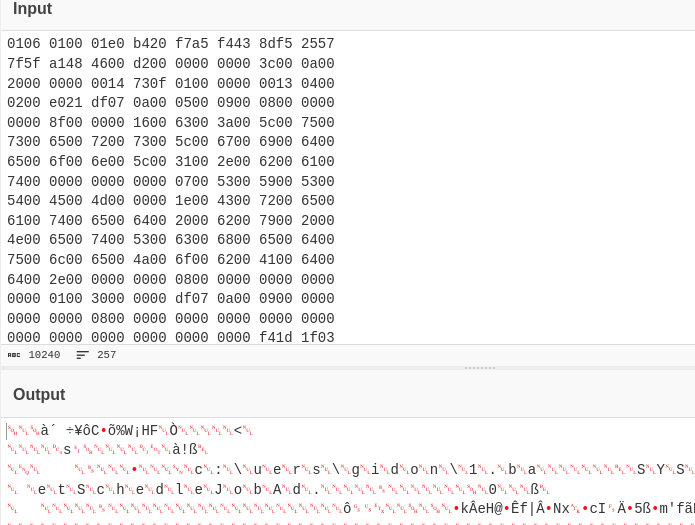
Instantly c:\users\gidon\1.ba stood out to me. The text seems to be cut off, so I found the files location:
It’s real name was 1.bat, which made more sense. Then after dump that I could see it was the file I was looking for.

Question 21
Machine:POS What is the malware CNC’s server?
Answer 21
Knowing I am looking for any connections to do with iexplore.exe, a simple netscan gave me this:
Question 22
Machine:POS What is the common name of the malware used to infect the POS system?
Answer 22
So for this I know I needed to dump the iexplore.exe file from before. I used Malfind to get the PID and then dumped it via Malfind.
Then I uploaded it to VirusTotal.

Question 23
Machine:POS In the POS malware whitelist. What application was specific to Allsafecybersec?
Answer 23
So after a little research, this was something that had never crossed my mind. Malware having build in whitelists/blacklists. In order not to disrupt processes on a system to avoid protection and also targeted binaries/files for specific victims. In this case, running strings on the malware gave me the following:
allsafe_protector.exe.
Question 24
Machine:POS What is the name of the file the malware was initially launched from?
Answer 24
I actually found this answer accidentally before I found the previous one, using strings on the malware for the first time, I used the -el command and it gave me this:
allsafe_update.exe in the downloads folder. Which could indicate the initial launch vector. I could have also used the iehistory plugin to find this:
The URLs match up with the C2 servers IP address. Meaning the allsafe_update.exe is the original malware.

This was a tough lab, I needed a couple of nudges in the right direction near the end of the lab. But overall I did learn a few things and it was a rewarding experience!
Last updated