PacketMaze Lab
CyberDefenders Network Forensics Lab

Scenario
A company’s internal server has been flagged for unusual network activity, with multiple outbound connections to an unknown external IP. Initial analysis suggests possible data exfiltration. Investigate the provided network logs to determine the source and method of compromise.
Question 1
What is the FTP password?
Answer 1
Filtering the packets by FTP showed a login processes revealing a plaintext password:

Question 2
What is the IPv6 address of the DNS server used by 192.168.1.26?
Answer 2
Originally I read the question as, finding the IPv6 address of 192.168.1.26, but its finding the DNS in which that IP address uses. Which made more sense, always double check the question.
Locating the MAC address of the DNS server was key here, so I filtered for DNS requests. Then located a conversation between 192.168.1.26 with a DNS server, which turned out to be 192.168.1.10. Then it was a simple cross referencing the MAC address to the IP that ends in 10, with the IPv6 conversations.
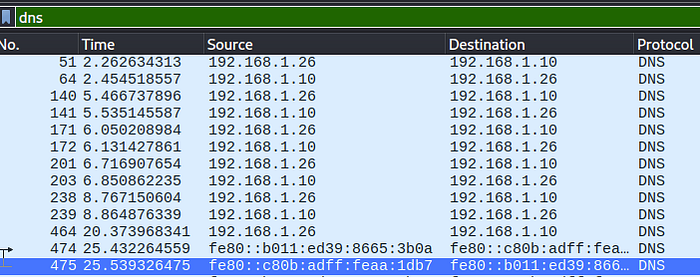
Giving me:
Question 3
What domain is the user looking up in packet 15174?
Answer 3

No need for an explanation here, just navigating to the packet and reading the data.
Question 4
How many UDP packets were sent from 192.168.1.26 to 24.39.217.246?
Answer 4
The Conversations tool in Wireshark is perfect for this question.
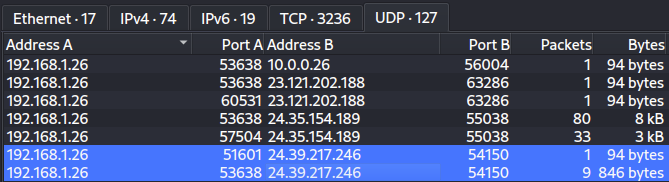
10 total packets sent.
Question 5
What is the MAC address of the system under investigation in the PCAP file?
Answer 5
In a previous question we are asked about the host machine contacting a DNS server. So finding the MAC address of the IPv4 192.168.1.26 was as easy as finding a single packet.
Question 6
What was the camera model name used to take picture 20210429_152157.jpg?
Answer 6
I first looked into any HTTP requests that might have downloaded an image, with no luck. Then I looked into FTP requests, finding 2 image files. A quick File -> Export -> FTP gave me the file to work with.


Question 7
What is the ephemeral public key provided by the server during the TLS handshake in the session with the session ID: da4a0000342e4b73459d7360b4bea971cc303ac18d29b99067e46d16cc07f4ff?
Answer 7
I searched the above string with CRTL+F, making sure to specify packet details and string.
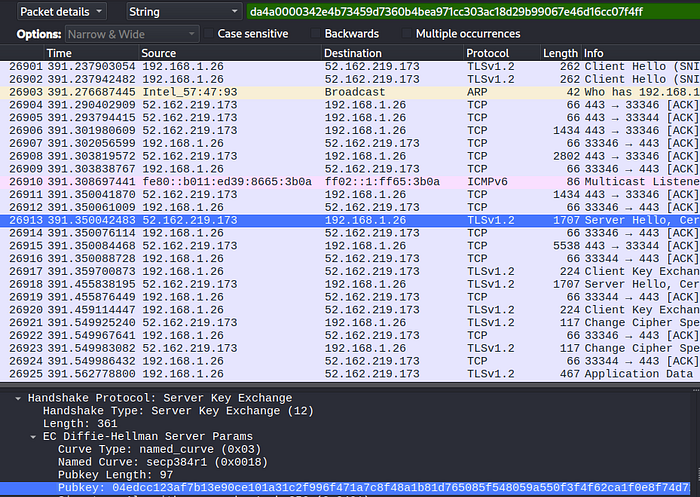
Leading me to packet number, 26913. Which held the public key, as seen in the image above.
Question 8
What is the first TLS 1.3 client random that was used to establish a connection with protonmail.com?
Answer 8
Specifying TLSv1.3 in the filter section then looking for the string “protonmail” led me to packet number, 17992. Which in turn gave me the random.

Question 9
Which country is the manufacturer of the FTP server’s MAC address registered in?
Answer 9
Knowing from a previous question what the IP address of the FTP server was, gave me the MAC address. Then I just searched it on a MAC address look up website to find the answer:

Question 10
What time was a non-standard folder created on the FTP server on the 20th of April?
Answer 10
This one I got a little stuck on, but I just had to filter for both FTP and FTP-DATA in order to find the answer. Filtering for FTP didn’t lead to much of anything, just a lot of FTP commands that were thrown around.
After filtering FTP-DATA I managed to find a ton more information. Then I just used Follow -> TCP Stream on the first result to find the following:

Most of those directories are used in Linux, however a folder name ftp is not standard. Which here is the answer.
Question 11
What URL was visited by the user and connected to the IP address 104.21.89.171?
Answer 11
Filtering the above IP address and looking for a Client Hello packet was enough to lead me to the answer:


Last updated